Workflow Blueprint
How to Build a Medical Lab Report Follow-Up AI Agent
This AI Agent is extremely useful for small scale hospitals and clinics. Analyze the medical report and organize it into a structured review , set alert on vitals values that fall outside clinic-defined ranges.
OperationsDirect Answer
This AI Agent can help a solo doctor or small clinic collect incoming lab reports, extract the important information, flag out-of-range results using predefined clinic rules, and send only the cases needing attention of a doctor. It reduces the time staff spend opening files, copying values, sorting reports, and remembering follow-ups.
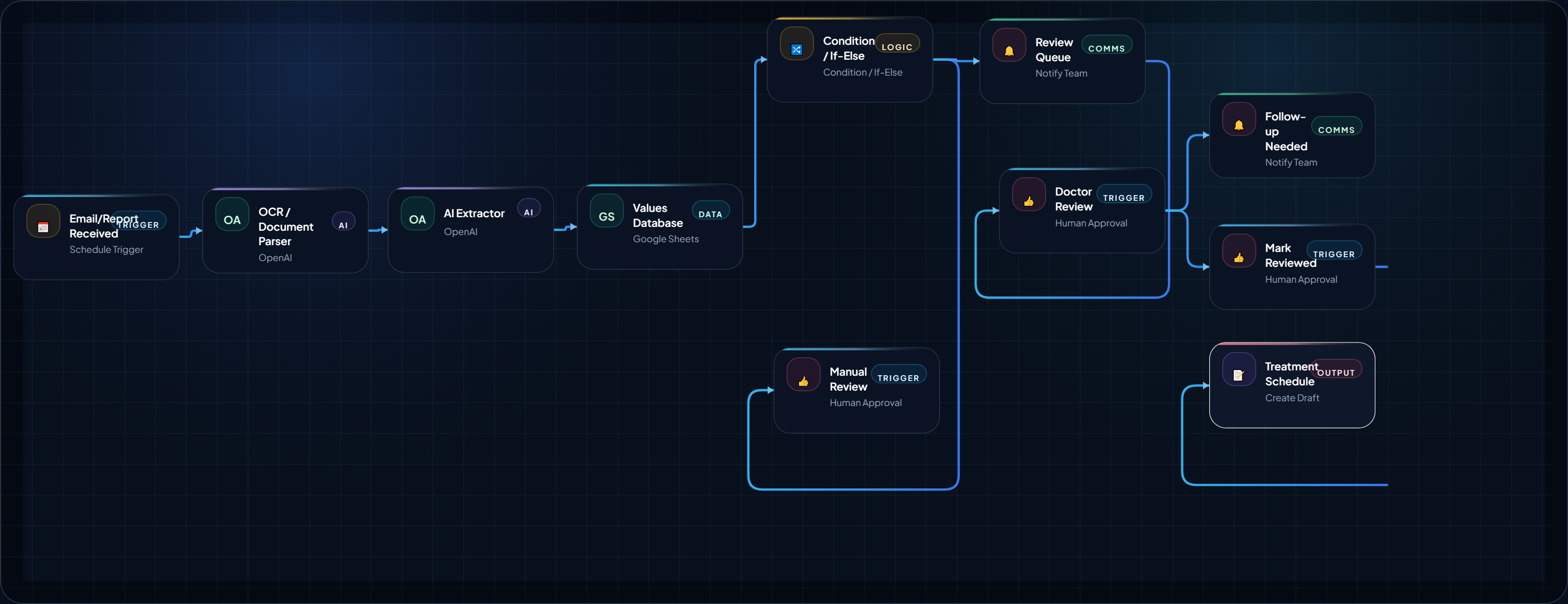
Workflow Logic / System Flow
Structured steps
Step 1
TriggerReceive Lab Report
Start the workflow when a new report arrives in the clinic's approved intake location.
- Tool Hint
- Gmail/Outlook, Google Drive, OneDrive, n8n/Make webhook
- Estimated
- 2 min
Step 2
ProcessStore Original Report
Save the original document and create a unique report record before processing begins.
- Tool Hint
- Google Drive, OneDrive, S3-compatible storage, Airtable
- Estimated
- 3 min
Step 3
ProcessExtract Report Data
Extract patient reference, report date, laboratory, test names, values, units, reference ranges, and other clearly identifiable fields.
- Tool Hint
- OpenAI, Claude, OCR/document parser
- Estimated
- 5 min
Step 4
ProcessCheck Extraction
Determine whether the report was extracted reliably enough to continue or should be sent to manual review.
- Tool Hint
- OpenAI/Claude, condition node, confidence rules
- Estimated
- 3 min
Step 5
ProcessApply Clinic Rules
Compare extracted values with the clinic's approved rules and mark which values require review.
- Tool Hint
- Airtable, Google Sheets, PostgreSQL/MySQL, If-Else node
- Estimated
- 5 min
Step 6
ActionSet Review Priority
Assign an operational review category based on the clinic's predefined rules and data-quality status.
- Tool Hint
- n8n/Make router, database rules, AI classification
- Estimated
- 3 min
Step 7
ReviewDoctor Reviews
Present the original report and structured rule results to the doctor or authorised clinical reviewer for a final decision.
- Tool Hint
- Email, secure task system, internal dashboard, clinic software
- Estimated
- 10 min
Step 8
CustomCreate Follow-Up Task
Record the review outcome and create an administrative follow-up task when the doctor determines that one is required.
- Tool Hint
- Airtable, Asana, Trello, clinic task system
- Estimated
- 3 min
Step 9
ActionCreate Follow-Up Task
Record the review outcome and create an administrative follow-up task when the doctor determines that one is required.
- Tool Hint
- Airtable, Asana, Trello, clinic task system
- Estimated
- 3 min
Step 10
CustomLog Review Result
Save the workflow status, reviewer action, follow-up status, and timestamps for operational tracking.
- Tool Hint
- Airtable, PostgreSQL/MySQL, Google Sheets
- Estimated
- 2 min
Implementation Matrix
Structured execution block
Table structure is intentionally designed as an upgradeable execution layer for future automation modules.
| Phase | Owner Layer | Output Artifact | Success Metric |
|---|---|---|---|
| Capture context | A general practitioner or small clinic with a limited staff that receives laboratory reports regularly but does not have a dedicated team or trained person to evaluate the report. The clinic | Input brief + constraints | Inputs are complete and unambiguous |
| Run workflow logic | Workflow engine (planned stack layer) | Processed decision/output | Output follows the defined rules |
| Deliver action | Execution operator | Message/task delivered | Delivery reaches intended audience |
| QA + optimize | Human reviewer | Review notes + revision queue | Failure points reduced over time |
Operator-Ready Recommendations
Recommended Tools for This Workflow (Coming Soon)
This workflow is prepared for a recommended tool stack layer, but the curated tool picks have not been published yet.
Stack Slot 1
Workflow Engine
Orchestration layer for triggers, branching logic, and operational controls.
Stack Slot 2
AI Brain
Reasoning layer for summarization, drafting, and decision support modules.
Stack Slot 3
Messaging / Delivery Layer
Distribution channel for tasks, notifications, and handoff into team workflows.
Workflow Mid Content
Placeholder framework only. This reserved block can be swapped to live AdSense markup later.
Reserved after the recommended tool stack so future ads can appear in a high-intent zone without interrupting the hero or trust-critical opening screen.
Operator Prompts
Use these reusable prompt blocks to guide implementation, QA, handoff, or operator execution.
Extract Lab Report Data
custom
Extract only information that is clearly present in the laboratory report.
Return structured data for:
- patient_reference
- report_date
- laboratory_name
- test_name
- measured_value
- unit
- reference_range
- report_status
- extraction_warnings
Rules:
1. Do not guess missing information.
2. Preserve numbers exactly as shown when possible.
3. Keep the unit attached to the correct measurement.
4. Preserve the laboratory's stated reference range.
5. If a field cannot be read confidently, return null and explain the issue in extraction_warnings.
6. Do not diagnose the patient.
7. Do not provide treatment recommendations.
8. Do not infer medical meaning that is not explicitly contained in the document.
9. If multiple patient identifiers appear, flag the conflict instead of choosing one.
Return valid structured JSON only.
Use immediately after document/OCR extraction. Adjust field names to match the clinic database.
Validate Extracted Data
checklist
Review the extracted laboratory data for data-quality problems.

Check for:

- missing patient reference
- missing report date
- missing test name
- missing value
- missing unit where a unit is expected
- suspicious OCR characters
- conflicting patient identifiers
- duplicated tests
- impossible or clearly malformed numeric values
- unclear reference ranges
Do not decide whether the patient is medically well or unwell.
Return:
status: PASS, MANUAL_REVIEW, or BLOCKED
warnings:
List the specific data-quality problems.
reason:
Give one short explanation.
If information is uncertain, choose MANUAL_REVIEW rather than guessing.
Put this before any rule-based routing. A bad extraction should never silently become a workflow decision.
Apply Review Rules
checklist
You are checking laboratory values against a clinic-provided rules table.
Use only the rules supplied in the input.
For each matching test:
1. Compare the extracted value with the supplied rule.
2. State whether the configured rule was triggered.
3. Identify the test and value involved.
4. Quote the applicable configured threshold or condition.
5. Do not invent a threshold.
6. Do not use general medical knowledge to create a new threshold.
7. Do not diagnose the patient.
8. Do not recommend treatment.
9. If the test cannot be confidently matched to a rule, mark it as UNMATCHED.
10. If the value or unit is uncertain, mark it as MANUAL_REVIEW.
Return:
rule_status
triggered_rules
unmatched_tests
manual_review_items
The rules table should be controlled by the clinic and reviewed by an appropriately qualified professional.
Prepare Doctor Review
system
Prepare a short internal review summary for the doctor.
Include:
- patient reference
- report date
- report source
- tests that triggered configured clinic rules
- values and units
- relevant configured rule or threshold
- extraction warnings
- unresolved items
Do not diagnose.
Do not recommend treatment.
Do not tell the patient what to do.
Do not add medical conclusions that are not explicitly present in the supplied workflow data.
End with:
"Doctor review required before clinical action."
This is an internal review aid, not a patient-facing message.
Follow-Up Task Draft
system
Create an administrative follow-up task from the doctor's approved review outcome.
Include:- patient reference
- report reference
- follow-up required: yes/no
- assigned person
- task description
- due date if explicitly provided
- review status
- notes from the doctor's decision
Do not create a clinical recommendation.
Do not invent a due date.
Do not add information that was not provided by the reviewer.
The task should be concise and suitable for an internal clinic task system.
Run only after the doctor or authorised reviewer has approved the case outcome.
Detailed Blueprint Body
Use Case Summary
• Who uses this: Solo doctors, small clinics, diagnostic-focused practices, and general practitioners. • Problem solved: Lab reports can arrive through email, uploads, shared folders, or other channels and easily get missed or reviewed late. • Likely tools: Email or file trigger, OCR/document extraction, an AI model, Airtable/Google Sheets/database, condition logic, and a human approval step. • Outcome: Each report becomes a structured record with abnormal/out-of-range items, priority, review status, and a follow-up task. • Human review: The doctor or authorized clinical professional reviews flagged results before any medical action is taken. • Important boundary: The workflow identifies values against pre stored rules or saved values; it does not diagnose disease, recommend treatment, or independently decide what a patient should do.
Introduction
Why Small Clinics Lose Time on Lab Reports
A lab report may look simple to a doctor, but handling hundreds of them over time creates a surprisingly large administrative workload.
A report can arrive as an email attachment, a PDF upload, a scanned document, or a file sitting in a shared clinic folder. Someone then has to open it, identify the patient, find the relevant values, notice anything outside the clinic's defined ranges, and make sure the report reaches the right person for review.
The problem is not necessarily that the information is difficult to understand. The problem is that the same small pieces of work have to be repeated again and again.
The useful idea: is to automate the process of handling this report before it reaches the point of decision by a doctor .
What This Workflow Changes
Instead of treating every incoming report as a manual task, the clinic can create a simple review pipeline:
- Receive the incoming report.
- Compile information like patient details.
- Analyze the test report values .
- Compare these values with rules defined by the clinic.
- Flag abnormal reports and prioritize the report for review.
- Send the case to the doctor or authorized reviewer.
- Create a follow-up task after review.
- Keep an audit-friendly record of what happened.
The important distinction is that the AI is helping with information handling and workflow management. This AI Agent is not meant for diagnosing the patient and prescribing treatment. This option lies only with the qualified doctor .
Why This Is Useful Now
Small clinics increasingly work with PDFs, digital laboratory portals, email attachments, scanned documents, and cloud storage. A lightweight workflow can connect these existing processes without requiring the clinic to immediately replace its entire practice-management system.
For a small team, even saving a few minutes per report can add up. More importantly, a structured queue makes it easier to see which reports are waiting for review and which cases already have a follow-up task.
Implementation Guide
How this AI Agent Works for Clinics
The workflow is easiest to understand as a smooth transition between AI automation and a human reviewer.
The automation prepares the information. The doctor makes the clinical decision.
1. Collect the Lab Report
The workflow starts when a new report appears in the clinic online or offline. This could be in an email , an online cloud folder, an upload form, or another system that can trigger an automation.
The first job is simply to make sure the original file is preserved and associated with a unique report record.
2. Extract the Report Information
An OCR or document-processing step reads the report and extracts fields such as patient identifier, report date, laboratory name, test name, measured value, unit, and reference range when those fields are available.
The original document should remain available. Extracted information should be treated as a working copy rather than a replacement for the source report.
3. Check the Extracted Data
Before applying rules, the workflow should check whether the extraction looks complete.
- Is there a patient identifier?
- Is the report date available?
- Were test names and values extracted?
- Are units present where expected?
- Did OCR produce suspicious or incomplete text?
If important information is missing, route the report to a manual review queue instead of trying to guess the missing data.
4. Compare Values With Clinic Rules
This is where the workflow becomes more useful than simply summarising a PDF.
The clinic can maintain a rules table containing the tests it wants to monitor and the conditions that should cause a review flag. These rules should be created and approved by the clinic's appropriate medical professional.
The automation compares extracted values with those configured rules. It should report the result as a rule check—for example, "outside configured reference threshold"—rather than turning the result into a diagnosis.
Keep the rule source separate from the AI. Store important thresholds and workflow rules in a controlled table or database rather than asking an AI model to invent them. This agent is not allowed to research the web for comparing values and giving any view.No , not at all. This is not the purpose of this AI Agent workflow.
5. Prioritise the Review Queue
Once the rules are checked , the workflow can assign next priority such as Routine Review, Priority Review, or Manual Review Required.
The exact criteria or value ranges should be defined by the clinic. The AI should not independently decide that a patient is medically stable or need any urgent attention.
A practical way to handle uncertain or incomplete cases is to send them into the highest human-review queue rather than silently passing them through.
6. Send the Case to the Doctor
The doctor receives a concise review item containing the patient details, report date, extracted findings, value checks, and a link to the original report.
The qualified person can then study the original lab report and make the appropriate clinical decision.
7. Create the Follow-Up Task
Once the doctor has reviewed the report, the workflow can create an administrative follow-up task.
For example, the task could record that the report was reviewed, whether patient contact is required, who is responsible for the next action, and when the task should be checked again.
The actual patient communication should remain subject to the clinic's normal consent, privacy, and communication procedures.
8. Log the Result
The final step records the workflow status in a database, spreadsheet, or clinic operations system.
A useful record might include:
- Report ID
- Patient reference
- Report received date
- Extraction status
- Rule-check status
- Review priority
- Doctor review status
- Follow-up required
- Assigned staff member
- Follow-up due date
- Last updated timestamp
Where AI Helps
AI is particularly useful when the report format varies between laboratories or when reports contain lots of text that staff would otherwise have to copy manually.
Good AI tasks include extracting structured information, identifying likely test/value pairs, cleaning inconsistent formatting, producing a short review summary, and highlighting fields that need human verification.
AI should not be the source of medical thresholds, diagnoses, treatment decisions, or autonomous patient instructions.
Where Human Review Is Essential
No medical decisioin is taken by this AI Agent. This workflow is designed in such a way that , the final medical decision is done a doctor or a qualified person.
Human review is especially important when:
- The document is poorly scanned.
- The patient cannot be confidently identified.
- Units or reference ranges are missing.
- The report contains unusual formatting.
- The workflow encounters a test it does not recognise.
- Multiple reports or patient records appear to have been mixed.
- A result triggers a clinic-defined high-priority rule.
Practical Tool Choices
A first prototype does not need a large medical software stack. A small workflow can be built from common automation components.
- Automation: n8n, Make, or Zapier
- Document extraction: OCR/document parsing service or an AI model with document input
- AI processing: OpenAI, Claude, or another approved model
- Rules: Airtable, Google Sheets, database table, or clinic-controlled configuration
- Review: Email, secure internal notification, task system, or clinic application
- Logging: Airtable, database, spreadsheet, or existing practice-management system
For a real clinic, the choice should be based not only on convenience but also on the provider's data-processing terms, access controls, retention policies, encryption, audit requirements, and applicable healthcare privacy regulations.
Operator tip: Start with one report format and a small set of clinic-approved rules. Prove the workflow works before trying to support every laboratory document.
Common mistake: Do not let the AI decide what an abnormal medical result means. Let the clinic's configured rules identify values requiring review, then let the doctor interpret them.
Expected Outcome
A successful implementation gives the clinic a clear work queue instead of a pile of unstructured reports.
Staff can see which reports arrived, which were successfully processed, which need manual checking, which are waiting for the doctor, and which already have follow-up actions.
The real benefit is not "AI diagnosis." It is removing repetitive administrative work while making the human review process easier to manage.
Conclusion
A Better Way to Handle Routine Report Follow-Up
Small clinics do not necessarily need a complicated autonomous medical AI system to improve their workflow. A controlled pipeline that captures reports, structures information, checks predefined clinic rules, and creates a human review queue can already remove a meaningful amount of repetitive work.
The safest design is also the most practical: automation prepares the case, the clinic's approved rules control the checks, and the doctor remains responsible for clinical interpretation and action.
You can prototype this entire flow first in the AgentsCanva Demo Builder. Sketch the trigger, extraction, rule-checking, routing, doctor approval, follow-up, and logging nodes before connecting real patient data or paying for production automation.
Build the workflow before building the infrastructure. Test the logic with synthetic or de-identified reports first. Once the process is reliable, evaluate the privacy, security, compliance, and integration requirements for a real clinic deployment.
Trust & Review Layer
- Last verified
- August 19, 2026
- Non-coder fit
- Mixed fit
- Setup friction
- Moderate
- Data/compliance caution
- Review data handling and access controls before deployment.
Common Failure Points
- Unclear trigger definitions create inconsistent workflow entry states.
- Missing QA checkpoint leads to output drift over time.
- No ownership assignment causes implementation stalls after pilot launch.
Human Review / Implementation Notes (Template Slot)
Use this section to log field notes, friction points, and revision priorities after each live run. This block is intentionally structured for future review workflows.
Publisher Identity
Published & Reviewed by AgentsCanva Editorial
This blueprint is curated for practical implementation quality. Our editorial layer emphasizes real execution context, trust framing, and periodic re-verification as tools evolve.
ROI Lab (Coming Soon)
Future ModuleThis reserved space will host savings, time-to-value, and effort comparison tools for implementation planning.
Discovery Engine
Keep Exploring This Topic
Continue deeper into related blueprints and editorial signals chosen with simple published-only matching and recent fallback logic.
Related Workflow Blueprints
Nearby implementation patterns from the workflow library.
Blueprint Card
ai-medical-record-summarization-agent
AI Medical Record Summarization Agent
Organize scattered patient records into a concise, easy to handle document which can help doctors prepare faster before a consultation. This i...
August 21, 2026
Open Blueprint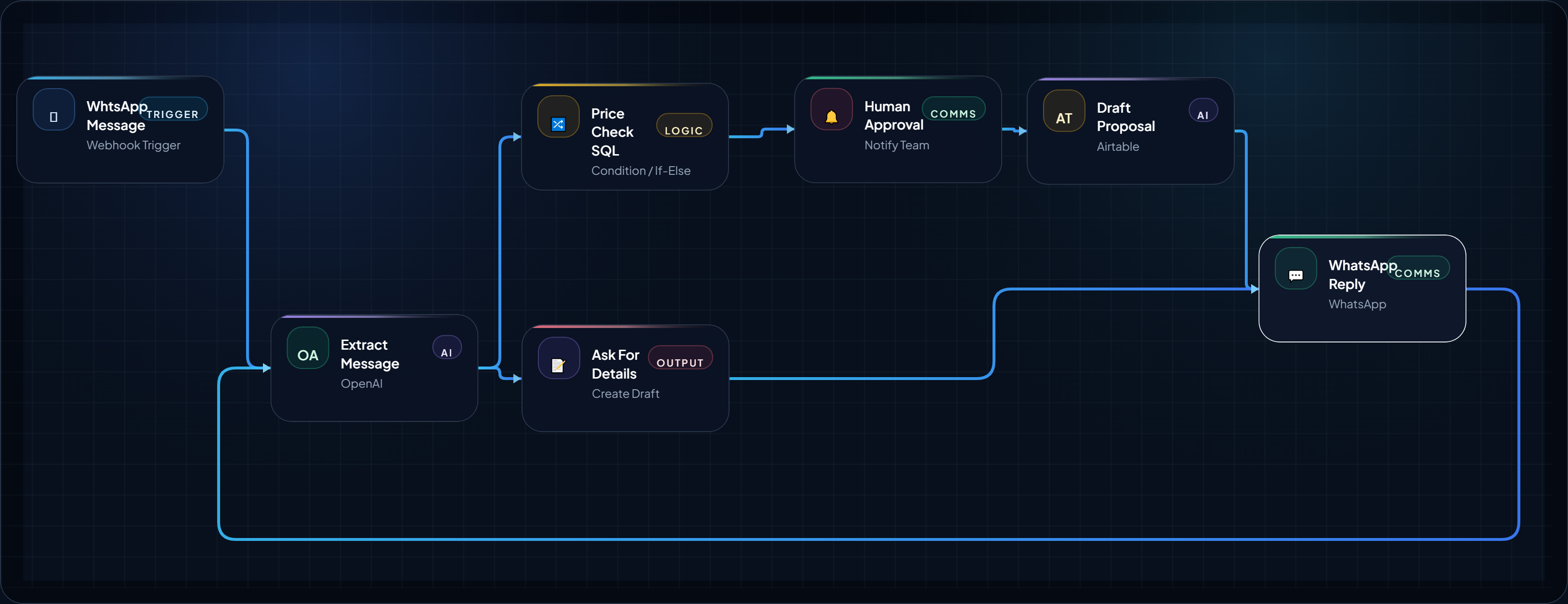
WhtsApp Message to Proposal in 5 Minutes: FREE Money Making AI Agent for Agencies
Turn your “How much?” price query on WhtsApp into cash generating lead by automatic pricing check, proposal draft, and follow-up task in o...
August 14, 2026
Open BlueprintBlueprint Card
build-a-24-7-whatsapp-quoting-agent-for-local-service-businesses
WhatsApp Quoting Agent for Local Service Businesses
Create a fast, practical WhatsApp-based quoting workflow that helps plumbers, HVAC teams, cleaners, and local service operators respond to “...
August 11, 2026
Open BlueprintRelated Analysis & Signals
Editorial context that expands the strategy around this blueprint.
Workflow Closing Placement
Placeholder framework only. This reserved block can be swapped to live AdSense markup later.
Reserved before the final next-step CTA so the lower page can support monetization without breaking the main implementation flow.
What This Blueprint Proves / Next Step
You now have an execution-ready structure with logic, trust framing, and implementation scaffolding. Next, choose where to expand.